Friday, May 7, 2010
Yet another dCAT bug squished
If you use a dCAT dictionary, download the stenowinder.py I just uploaded to the Github a minute or so ago. It fixes the bug that was happening when the O- key was pressed either alone or with the asterisk. I'll squish every last one of those dCAT bugs, if it's the last thing I do!

Thursday, May 6, 2010
Collaboration!
So Moss, my awesome programmer friend, came down from Boston and worked with me today on Plover for four glorious hours. The good news is that we made several changes to the structure of the program, arranging things more logically so they could be handled in a less convoluted way and laying the groundwork for the next several things on the agenda, namely:
1. Reconciling the Gemini version of Plover with the Sidewinder version of Plover. (Currently they're in two separate files, and the Gemini version doesn't interact with the GUI part of the program.)
2. Making it so that words deleted by the asterisk key in the GUI are also deleted in the log file. (Currently log.txt just records all translations made during the session, even if they were supposed to have been deleted.)
3. Fixing the bug where, if more than the maximum recognized number of keys is pressed on the Sidewinder at once (which seems to be around 13 and up), the program freezes because the "released keys" list is longer than the "pressed keys" list, and so it can't figure out when to process the stroke, flush it, and move on.
4. Eventually adding special syntax recognition, so that punctuation, capitalization, glue strokes, and adfixes all work properly. This is at the bottom of the list, but it's an important step to get to in terms of Plover's actual usefulness as a method of text entry.
The bad news is that we haven't actually implemented any of those features -- yet. We did add a test file (stenowinder_tests.py) for developers to use in figuring out dCAT versus Eclipse compatibility, and we also made two little helper files to streamline the process of swapping out dictionaries and changing the 'dCAT' or 'Eclipse' flag in stenowinder.py.
* If you have a dCAT dictionary, rename it 'dCATDict.py', then download dcattktest.py, stenowinder.py, and tktest.py. Run dcattktest.py and it should launch the GUI in the proper format.
* If you have an Eclipse dictionary (like ploverbd.py), rename it 'eclipseDict.py', download eclipsetktest.py, stenowinder.py, and tktest.py. Run eclipsetktest.py and it should launch the GUI in the proper format.
I know this seems more convoluted than it used to be, but it keeps people from making mistakes when switching between dictionary formats, like I did last week when I thought I'd fixed the asterisk bug and it turned out I'd just forgotten to switch between 'dCAT' and 'Eclipse' format. The difference between this solution and the alternate files I made (and later discarded, namely dcattest.py and dcatwinder.py) when I first converted the StenoMaster dictionaries is that eclipsetktest.py and dcattktest.py are just tiny little launching programs, not an entirely separate fork of Plover, so I can make as many changes as I want to the main program and they should still work fine. It's better. Trust me. More later!
1. Reconciling the Gemini version of Plover with the Sidewinder version of Plover. (Currently they're in two separate files, and the Gemini version doesn't interact with the GUI part of the program.)
2. Making it so that words deleted by the asterisk key in the GUI are also deleted in the log file. (Currently log.txt just records all translations made during the session, even if they were supposed to have been deleted.)
3. Fixing the bug where, if more than the maximum recognized number of keys is pressed on the Sidewinder at once (which seems to be around 13 and up), the program freezes because the "released keys" list is longer than the "pressed keys" list, and so it can't figure out when to process the stroke, flush it, and move on.
4. Eventually adding special syntax recognition, so that punctuation, capitalization, glue strokes, and adfixes all work properly. This is at the bottom of the list, but it's an important step to get to in terms of Plover's actual usefulness as a method of text entry.
The bad news is that we haven't actually implemented any of those features -- yet. We did add a test file (stenowinder_tests.py) for developers to use in figuring out dCAT versus Eclipse compatibility, and we also made two little helper files to streamline the process of swapping out dictionaries and changing the 'dCAT' or 'Eclipse' flag in stenowinder.py.
* If you have a dCAT dictionary, rename it 'dCATDict.py', then download dcattktest.py, stenowinder.py, and tktest.py. Run dcattktest.py and it should launch the GUI in the proper format.
* If you have an Eclipse dictionary (like ploverbd.py), rename it 'eclipseDict.py', download eclipsetktest.py, stenowinder.py, and tktest.py. Run eclipsetktest.py and it should launch the GUI in the proper format.
I know this seems more convoluted than it used to be, but it keeps people from making mistakes when switching between dictionary formats, like I did last week when I thought I'd fixed the asterisk bug and it turned out I'd just forgotten to switch between 'dCAT' and 'Eclipse' format. The difference between this solution and the alternate files I made (and later discarded, namely dcattest.py and dcatwinder.py) when I first converted the StenoMaster dictionaries is that eclipsetktest.py and dcattktest.py are just tiny little launching programs, not an entirely separate fork of Plover, so I can make as many changes as I want to the main program and they should still work fine. It's better. Trust me. More later!
Tuesday, May 4, 2010
Spoke too soon?
After I gave up in frustration and went to do the dishes, I suddenly got a brainwave between the Chana Masala pan and the teacup and thought that I knew exactly where the problem was. I ran to the computer, made the fix and... Well, it seems to work. I think. As far as I can tell. More testing needed, my intrepid dCAT dictionary users. Please let me know if it's still busted!
Asterisk bug still not fixed
Yes, it's the bane of my existence. The asterisk bug is still giving me hell. Argh. Hopefully I'll be able to whup it in the next day or two, but until then, dCAT dictionary users, I think you're out of luck. Many apologies.
Sunday, May 2, 2010
Another bugfix for dCAT format dictionary users
Hey, Sonja informed me that the asterisk key wasn't working in stenowinder with dCAT turned on. I think I've just fixed that. Get the update at the Github (just download stenowinder.py and switch the setting from Eclipse to dCAT, then run tktest.py as usual) and let me know!
Thursday, April 29, 2010
Bug fixes
For any of you that are using DigitalCAT-formatted dictionaries (e.g. the one that comes with Stenomaster), I've fixed a major bug and I've also consolidated the files, so you don't need to use dccattest.py or dcatwinder.py anymore. Just download stenowinder.py and tktest.py at the GitHub, then open stenowinder.py in any text editor. The first few lines of the file look like this:
from ploverbd import exportDic
import unittest
import sys
# choose either 'dCAT' or 'Eclipse'
dictType = 'dCAT'
If it already says dCAT and you have a DigitalCAT-formatted dictionary, you're set. If it says Eclipse, change it to dCAT. Unless you have an Eclipse-formatted dictionary, in which case change it from dCAT to Eclipse. You get the idea. The default distributed dictionary, ploverbd.py, is in Eclipse format. Also, it's apparently grown too big to be directly accessed by Github's html parser and has to be downloaded by right click/save as (wait a while for it to muster its strength) or by getting the whole package by clicking the "download source" button.
New and exciting features, like functional file output and maybe even punctuation formatting, will with luck be added on Monday, (and sometime after that, I hope to add TX and Stentura protocol options into the program; I got the protocol specs today, but I can't make any sense of them, and they're second in priority to figuring out this file output thing.) If you guys find any more bugs, though, drop me a line and I'll try to patch them up as they come in.
from ploverbd import exportDic
import unittest
import sys
# choose either 'dCAT' or 'Eclipse'
dictType = 'dCAT'
If it already says dCAT and you have a DigitalCAT-formatted dictionary, you're set. If it says Eclipse, change it to dCAT. Unless you have an Eclipse-formatted dictionary, in which case change it from dCAT to Eclipse. You get the idea. The default distributed dictionary, ploverbd.py, is in Eclipse format. Also, it's apparently grown too big to be directly accessed by Github's html parser and has to be downloaded by right click/save as (wait a while for it to muster its strength) or by getting the whole package by clicking the "download source" button.
New and exciting features, like functional file output and maybe even punctuation formatting, will with luck be added on Monday, (and sometime after that, I hope to add TX and Stentura protocol options into the program; I got the protocol specs today, but I can't make any sense of them, and they're second in priority to figuring out this file output thing.) If you guys find any more bugs, though, drop me a line and I'll try to patch them up as they come in.
Monday, April 26, 2010
Finally, high-rez pictures!
A friend came to my coworking space today and brought a camera, so I finally have good pictures of my kepadified Sidewinder X4. Here it is alongside my $2,395 Revolution Grand:
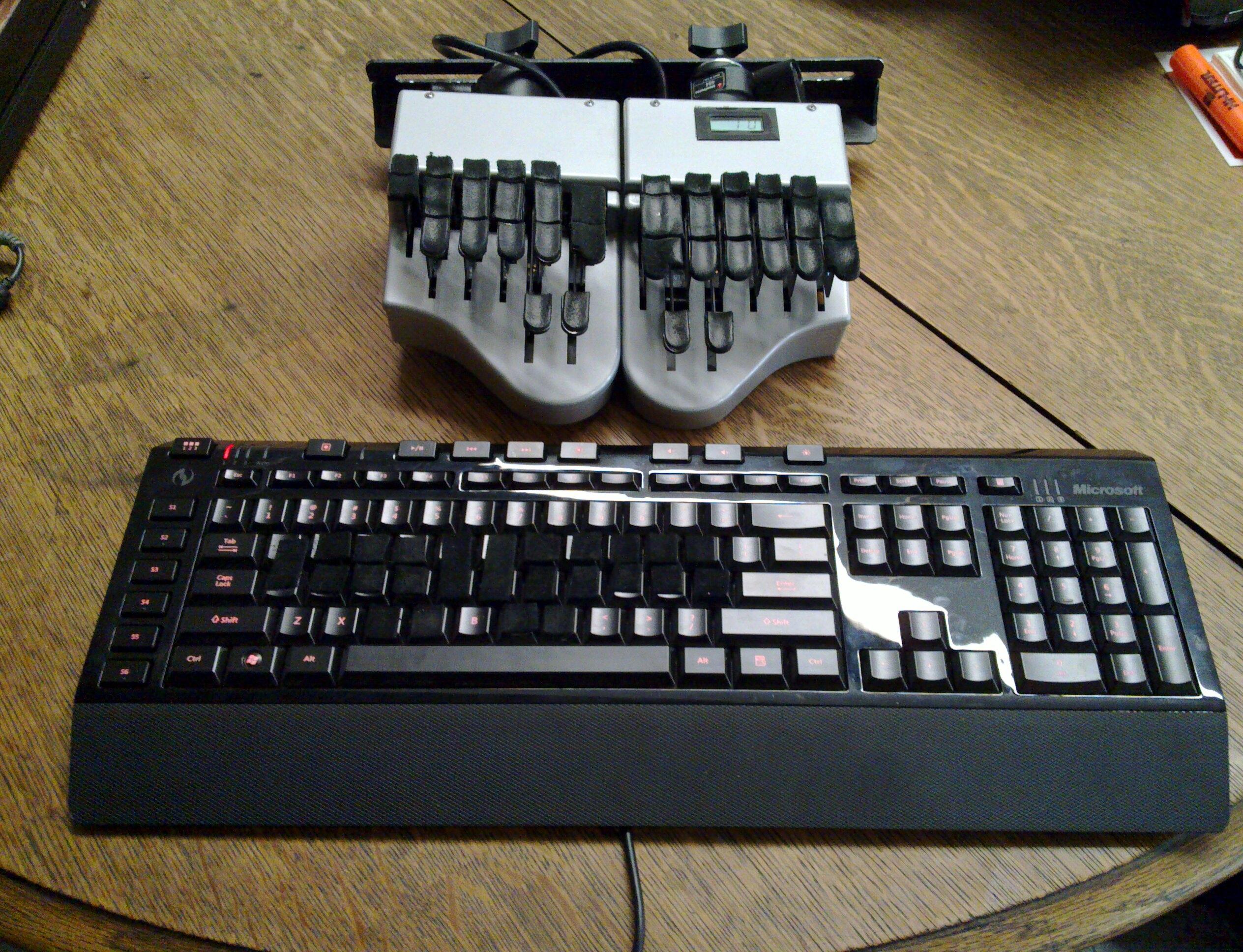
And here's a closeup of the keypads, making a more or less steno keyboard shape out of the crooked qwerty keys:

Many thanks to Sumana for the pictures.
In other news, I had my Python lesson today, and we got a stopgap file output system working, but I don't want to upload it to the github yet, because while the asterisk is still deleting strokes properly in the GUI display, it's not deleting them in the file, which makes for confusing reading (unless you're one of those people who are 100% accurate at all times, in which case just say the word and I'll upload it with all speed.) But if all goes as planned we'll fix the problem next week and I'll be able to give you guys a way to save the text you're stenoing with your awesome $60 keyboards. And maybe I'll try to do a little hacking on my own until then, so stay tuned.
And here's a closeup of the keypads, making a more or less steno keyboard shape out of the crooked qwerty keys:
Many thanks to Sumana for the pictures.
In other news, I had my Python lesson today, and we got a stopgap file output system working, but I don't want to upload it to the github yet, because while the asterisk is still deleting strokes properly in the GUI display, it's not deleting them in the file, which makes for confusing reading (unless you're one of those people who are 100% accurate at all times, in which case just say the word and I'll upload it with all speed.) But if all goes as planned we'll fix the problem next week and I'll be able to give you guys a way to save the text you're stenoing with your awesome $60 keyboards. And maybe I'll try to do a little hacking on my own until then, so stay tuned.
Subscribe to:
Posts (Atom)