Wednesday, October 19, 2011

Introducing the Ploverpad!

The brilliant minds behind The Plover Wiki have struck again. If you or someone you know has been intrigued by steno but is intimidated by the prospect of installing Ubuntu and downloading a full-fledged keyboard emulator like Plover, what would you say to a taste of steno that you can experience using only your browser and an ordinary qwerty keyboard? Check it out!

Click here to try out the Ploverpad!


As in the old-timey versions of Plover (remember back that far?), punctuation is currently displaying with Eclipse syntax instead of gluing and capping and all that meta stuff. Oh, and it only translates one-stroke words. But I was playing with it this evening, and I was really kind of surprised by how much I could write by restricting myself only to words that could be written in one stroke, plus prefix and suffix strokes. If you know a bit of steno, give it a try and see how long a sentence you can come up with using only one-stroke words. Post them to comments, if you like. I'd love to see what y'all come up with.

Even if you don't know steno, the Ploverpad can be really useful to help you learn the keyboard. Print out a copy of the Steno Keychart and walk yourself through the alphabet. You'll see that the keys on the Ploverpad will light up according to the colors on the chart. Seriously, how cool is that? It's also useful to see how close to n-key rollover your ordinary computer keyboard is; you'll see that certain words will work properly, even if they take three or four keystrokes, but other words involving the same number of keystrokes won't register.

I think the Ploverpad will be invaluable for beginning steno students, people shopping for n-key rollover keyboards, and people who want to practice their steno when they're on computers that might not have Linux installed. But most of all I think it's a fantastic way to demonstrate what steno looks like in a simple, visually striking way with very little technical hassle required. Notice that you can also drag, drop, and resize all of the windows, so if you want to focus on steno keystrokes you can make the keyboard big, and then if you want to switch your focus to translation, you can increase the size of the output window and pour out one-stroke steno to your heart's content. John and Jay, who wrote the Ploverpad, will be adding features as they go along, so stay tuned! But it's already an amazing piece of work. Please feel free share the link around all over the place. Now anyone who wants to try their hand at steno can give it a shot by just clicking on a link. Our most seductive recruitment tool yet!

Friday, October 7, 2011

Split-Screen Demonstration


John, one of the guys who helped set up the Plover Wiki, mentioned that he'd tried to describe how Plover works to his friends, but they were having trouble picturing it. He thought a split-screen video, showing my fingers on the keyboard synced with a screen capture of Plover's output, would possibly do the trick. So here it is! It was recorded using the built-in camera of one laptop running Windows (trained on my fingers), while at the same time another laptop running Ubuntu received input from my Majestouch keyboard via Plover into Gedit. I also thought it might be instructive if I illustrated the chords I was pressing using my steno chart, so I put them all together this afternoon using TrakAx.

The first runthrough is in realtime (though I was trying to show each stroke as clearly as possible, so it's quite a bit slower than I usually write), and the second runthrough is in slow motion. First of all, sorry that the final TP-PL (period stroke) is out of sync; it was hard to see exactly when the period appeared on the small blurry preview screen, so I just took a wild guess, and wound up being a few seconds late. Second of all, you'll see a few random letters appear mysteriously on the screen and then get deleted, all without me touching the keyboard. That's an artifact of Plover's current output system. It works by sending ordinary qwerty keystrokes to the OS, then sending a corresponding number of backspaces to get rid of them, and finally sending the proper steno output to take their place. This is why Plover doesn't work well in programs like Vim, which use one-key command strokes, when using the qwerty keyboard as a steno machine. Plover in Gemini mode (using an actual proprietary steno machine) doesn't have this problem. The screen capture software (xvidcap) makes these deletion artifacts more prominent than they actually are while using Plover in real life; most of the time, you don't see the deletions at all, because they happen too fast to notice them. Third of all, if you try this at home with the default Plover dictionary, you might find that it comes out with "administration" rather than "demonstration" and "moreover" rather than "Plover". Stenographers' dictionaries are always changing, always adapting to the needs and emerging writing style of their owners. Modify your version of Plover's default dictionary for your own needs! I'm hoping to write another installment of Steno 101 addressing that, but I want to wait until we've implemented the just-in-time dictionary entry feature (the ability to add or modify dictionary entries while Plover is running, rather than having to shut it down, open the dictionary, make the change, and then start it back up again) that's next on the development list.

Finally, here's a static chart of the steno chords used in the video, with the English written beneath them. 16 steno strokes, compared to the 87 keystrokes needed to write it qwerty-style.

Monday, October 3, 2011

Plover Wiki is Live


Check out the new Plover Wiki
! This was put together by John and Jay, two new Plover fans, and I'm hoping that the rest of the Plover community will start contributing to it as well. I'll be going over the pages in the next few days, expanding and clarifying where necessary, but it's already a fantastic resource for Plover newbies and other interested parties. Feel free to browse through it, then make an account and start adding your own thoughts, ideas, theory charts, tips, tricks, fan art, screencasts, et cetera. Many, many thanks to John and Jay for getting this whole thing started!

Saturday, October 1, 2011

Captioned PyGotham Presentation is Up


Here's my talk. I stumbled over my words a bit at the beginning, but I think all in all I said pretty much everything I wanted to, and the audience asked lots of questions, which is always a good sign. When the camera pans over to the audience it looks like there are only a handful of people there, but actually I think there were about a dozen all together; several of them were on the other side of the aisle. I've been talking with several people I met at PyGotham, and the Plover Google Group has also picked up quite a bit lately. I'm really excited to see what's next. Josh sent me a small update the other day, with a few little bugfixes, and it seems to work perfectly, so I have a feeling the hiatus is almost over. Fingers crossed.

Tuesday, September 20, 2011

Plover Presentation at Pygotham

Well, Pygotham was fantastic, and I think the presentation I gave went pretty well. I haven't reviewed the video of it (though hopefully that'll be up in the next week or so, captioned with Universal Subtitles, natch), but from what I remember, the people who attended seemed intrigued by the idea of steno and asked lots of interesting questions. I've uploaded a PDF of the slides I used in my talk, so if you're interested, feel free to give them a look-over. They include the other faux screenshot for Hover Plover that I commissioned, pictured below:

Hover Plover Pixel Art by Derek Sneed

This is a top-scrolling space shooter. As I mentioned in the presentation, it's mainly a dictionary building game, as well as a way to reinforce muscle memory after defining each stroke. The enemy ships are coded to the number of strokes required to write the word sitting on their tailfins. So easy one-stroke words like "snails" (STPHAEULS) or "antidisestablishmentarianism" (SPHAEURPL) are the little green ships. The yellow ships are two-strokers, like "guardian" (TKPWARD/KWRAPB). Orange ships are three-strokers, like "bemusement" (PWE/PHAOUS/PLT). The big scary red ship should properly be a three-stroker, since it's "frangipani" (TPRAPBG/PA/TPHEU), but the player's dictionary doesn't have "frangipani" in it, so it appears as an "undefined", the fearsomest type of ship in the enemy fleet. The player can fingerspell the word, which will shoot it down once, but will force them to fingerspell it again the next time it appears. But they can also call up the Plover entry definition window, fingerspell it once, then stroke out the steno they'd like to apply it to, hit the enter key (which in the Plover default dictionary is R-R), and the ship will revert back into whatever type it should be. In this case, it'll go from scary red to slightly less scary three-stroke orange. Unfortunately Plover doesn't yet have this pop-up definition feature; it's the last big improvement we need to implement before Plover can be considered truly complete. But when that gets done, and when we're able to start developing Hover Plover, this is gonna be loads of fun to play, and tremendously useful practice. A debt of gratitude is owed to Typestriker, which gave me the idea of a top-down space shooter, though it's a qwerty game, so it doesn't have any of the steno-specific functionality that the Hover Plover version will have.


EDITED TO ADD:

My dear friend Martin has already gotten to work on the overarching plot of the game, which he posted in the comments. I thought I'd paste what he's come up with in the entry itself, since it amuses me greatly. Keep in mind that this isn't officially sanctioned Hover Plover canon yet, but it's definitely a start!

"Okay, work with me here, I have a vision:

The year is A.D. 2101 - and war was beginning! On the distant planet Chordos 10, the peaceful (but fast-moving!) Ploverian civilization is under attack from the vicious Qwertons.

You play as Ensign Stino Plover, a new recruit in the Ploverian Space Force. You start off in your ill-equipped plovercraft in the side-scrolling New Chord City, and you have to get to Cape Stenaveral to launch and join your PSF comrades in orbit to defend against the incoming Qwerton attack. That level is basically the beginning level you described in your last post. As the ground-based levels progress, your plovercraft gets more and more of the equipment it'll need to fight off the Qwertons - but the challenges also get harder and harder (take away the steno hints, etc).

Once you get to Cape Stenaveral and successfully input the launch code (a few lines of random text you have to stroke in at a certain speed and level of accuracy) you launch your newly tricked-out plovercraft into space to fight the Qwertons. This is the intermediate space shooter level you describe here. If you get shot down, you crash-land back on the planet, where you can repair your plovercraft by repeating part of the beginner level and then relaunching.

If, on the other hand, you manage to fend off the invading Qwertons, you must face a final boss challenge so advanced, so terrifying, that I haven't even thought of it yet. Muahahahaha!"

Sunday, September 11, 2011

Hover Plover Artwork!

Hover Plover Pixel Art by Derek Sneed

In preparation for my presentation on Plover at PyGotham this Saturday from 1:15 to 2:00 in room 5 (check out the whole schedule! It's gonna be a fantastic conference!), I've commissioned some pixel art to demonstrate what Hover Plover will look like once I'm able to get it developed. This is a faux screenshot from the intermediate level game, a 2D platformer that displays both English and steno while you try to keep your broken plovercraft from crashing into the rooftops of an unnamed metropolis long enough to make it to the  repair shop on the edge of town. In this game your plovercraft keeps moving forward at a constant pace, and you're only able to control it in brief vertical bursts by typing the steno stroke on the screen, which lifts it briefly  away from chimneys, greenhouses, water towers, stray cats, et cetera, before it starts sinking dangerously close to the buildings again. After a while, you'll be able to toggle off the steno hints and just write the words themselves. I think it'll be incredibly fun to play. Now I just need to figure out a funding source so we can get the thing made! But I've already got a couple of irons in that fire. More news on that later. Meanwhile, I've got to finish putting together the PyGotham presentation and also start coordinating some bugfixes with Plover's programmer so that it's in good shape for the next phase of development.

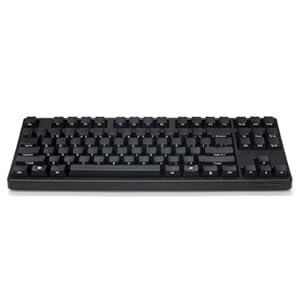
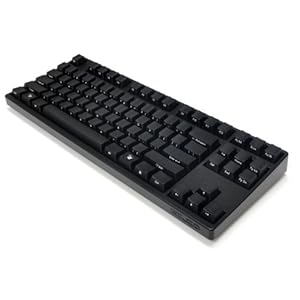
My main steno machine malfunctioned the other day (every stenographer's nightmare), and though I was able to fix it that evening with 15 minutes and a couple of screwdrivers (I think the calibration on a few keys had spontaneously gotten wonky, so the "all keys lifted" state wouldn't register), I didn't have time to tinker with it; I had a class to CART. So I fired up my Filco Majestouch with Plover, set the font size on Gedit to 28, and got through the next two hours. It was a struggle; the Majestouch requires harder keypresses than my proprietary machine, so I'm afraid my speed and accuracy suffered a bit. Plover's translation engine also needs a little more sophistication; it made some spelling errors that my proprietary software wouldn't have made. But it was worlds better than it would have been if I'd had to qwerty the class. Being able to carry two steno machines in my bag at all times really gives me peace of mind, and now that the worst has happened, I know that all is not lost if my main machine ever breaks down again. (Though, of course, I'm going to be getting it serviced in the very near future, so hopefully this was a one-off.) Let's hear it for Plover!

Sunday, August 21, 2011


It's been so long! But plenty's been happening on the Plover front behind the scenes. For one thing, I've been using Plover a lot more often since I bought a Filco Majestouch keyboard a month or so ago. Unlike the Sidewinder X4, it's actually small enough to fit in my steno bag along with my two computers, steno machine, and all my other stuff. Before, when I had to do transcription work on the train, I had to try to wrestle my steno machine onto its tripod, balance my computer on my steno bag, plug in the foot pedal, and keep everything in place with my thighs so it didn't topple over. A huge hassle, especially when the train was crowded. With the Majestouch, I just pull it out, plug it into my laptop, and put it on top of my laptop's keyboard. Couldn't be simpler! When I went to visit my family in Montana, I left my steno machine out of my bag so I had room for clothes, and wound up transcribing an entire 80-minute interview in three airports just using Plover and the Majestouch. One big advantage of Plover over traditional steno software is that it has complete control over the OS, so I can set KH-FG to "pause/play" and TR-RL to "rewind 1.5 seconds", keyed to autocommands in Audacious, which completely removes the need for a foot pedal. So that's quite exciting.


I'm also giving two presentations on Plover in the next few months: One at PyGotham on September 16th or 17th (the schedule isn't nailed down yet), and one at the Greater Washington Shorthand Reporters Association convention, on October 21st or 22nd. It'll be interesting to give one presentation to a group of programmers who are almost certainly unfamiliar with steno, and another presentation to a group of steno people who are almost certainly unfamiliar with Python, Linux, or Open Source. We're still working on possible funding leads for getting Plover out of hiatus (its main programmer, Josh Lifton, had a kid a few months ago, so I also wanted to give him a break while he adjusts to fatherhood and other big life changes.)

I've also -- slowly, oh, ever so slowly -- been putting my thoughts together for the next installment of Steno 101, but in the mean time, I wanted to link to something that a member of the Plover Google Group discovered on the internet a while back: Stenotypy the Machine Way, a steno manual from 1914. Surprisingly, there's still a lot of really good material in there. Of course, realtime transcription wasn't invented until the 1970s, so it doesn't include long vowels or conflict resolution (where a single steno outline corresponds to more than one English word or phrase). But even so, the example sentences alone are worth my time to dig through, and if anyone's frustrated with the glacial pace of Steno 101's development, they might to give it a glance.