Out of nowhere, our incomparable lead dev Hesky has delivered a knockout one-two punch. Version 2.3.1 was released only yesterday, but today he unexpectedly released an absolute whopper of an update: Version 2.4.0!
Download it here.
What's so amazing about this version? It has the crucial feature that I've been hankering for since Josh and I first started The Plover Project back in 2010: Just-in-time Dictionary Updates from the steno machine!! No longer do you have to shut Plover down, open up the dictionary file in a text editor, make your additions or edits by typing the steno in qwerty-style with all the accompanying JSON formatting, close the file, and restart Plover. Oh, no. Now you can do it seamlessly from within Plover itself, using your steno machine! Check it out.
Hesky sez: "To use the machine, add an entry to your dictionary that maps to {PLOVER:ADD_TRANSLATION}. When you type that stroke the dialog will pop up. When you type in the strokes field then raw strokes will be typed unless the stroke maps to a key combo or command. To navigate between the two fields use {#Tab}. To save the new entry use {#Return}. To cancel use {#Escape}.
A word of WARNING: This is the first version of plover that writes to your dictionary. In particular, if you are using an RTF dictionary then plover will not save anything in the dictionary that it doesn't understand. Please make sure to BACKUP YOUR DICTIONARY before using it with plover.
To open the dialog manually go to Configure... > Dictionary > Add Translation"
I personally have {PLOVER:ADD_TRANSLATION} defined as TKUPT (for "dictionary update"), {#Tab} defined as TA*B, {#Return} as R-R, and {#Escape} as FEFBG. Feel free to use those, or use your own preferred command strokes.
Seriously, though, this is Plover's killer feature. I've been using it in an experimental branch for several months, and it's increased Plover's usability more than I can possibly describe. Now that it's integrated into the main trunk and is far smoother and speedier to boot, I'm in absolute paradise. Go download it right away and add a bunch of entries!
Tuesday, July 9, 2013

Monday, July 8, 2013
Plover 2.3.1 Released!
From Hesky, Plover's lead developer:
"Hi Everyone,
There is a new version of Plover available: v2.3.1.
This is a minor update that includes the following features:
- Changing settings no longer requires restarting plover.
- There is a new display for machine status. This is most useful for stentura machines and pretty useful for other serial and usb machines.
- The serial port config dialog scans for ports in the background rather than hanging for several seconds.
In case you missed the previous announcement, plover now reads RTF/CRE dictionaries so conversion is no longer required.
Windows: https://github.com/plover/plover/releases/v2.3.1/2143/plover.exe
Mac: https://github.com/plover/plover/releases/v2.3.1/2142/Plover.dmg
Linux: Follow instructions here: https://github.com/plover/plover/blob/master/README.rst
As always, please let me know how it goes and if you have any trouble."
"Hi Everyone,
There is a new version of Plover available: v2.3.1.
This is a minor update that includes the following features:
- Changing settings no longer requires restarting plover.
- There is a new display for machine status. This is most useful for stentura machines and pretty useful for other serial and usb machines.
- The serial port config dialog scans for ports in the background rather than hanging for several seconds.
In case you missed the previous announcement, plover now reads RTF/CRE dictionaries so conversion is no longer required.
Windows: https://github.com/plover/plover/releases/v2.3.1/2143/plover.exe
Mac: https://github.com/plover/plover/releases/v2.3.1/2142/Plover.dmg
Linux: Follow instructions here: https://github.com/plover/plover/blob/master/README.rst
As always, please let me know how it goes and if you have any trouble."
Friday, June 28, 2013
Plover Now Supports RTF Dictionaries
Miguel recorded this video, writing along to "Tracks of My Tears" on his Sidewinder, six months after teaching himself steno with Plover. Amazing! Go congratulate him at the Aviary!
The magnificent Hesky Fisher has completed a new version of Plover which allows users to use dictionaries in rtf (aka rtf/cre, or rich text format court reporting extension) format, without having to go through the messy Python-based conversion kludge that we've been using up until now. This won't mean much to steno newbies, but anyone who's been using proprietary steno software and wants to give Plover a try can now use their own dictionaries, which I hope will make my colleagues in the court reporting, captioning, and CART communities very happy. If you're on Windows, you'll have to download the .exe file linked from the wiki and follow the instructions, but if you're on Linux, you can just get it from the Github. Check it out, and as always, if you have any bugs or feature requests, feel free to email me at plover@ploversteno.org, or drop the devs a line at the Plover Google Group.
Speaking of devs, if you want to play around with an alternate fork of Plover which includes support for a graphical dictionary editor, Try Garipeti's version. You'll have to build from source, so this is intended more for advanced users, but it's pretty cool. Check it out! We'll hopefully be folding some of the changes back into the canonical branch of Plover in future versions.
Exciting things are happening this summer, and I'm hoping to have an even bigger surprise for you guys in the next couple of months, but for now enjoy the new release. And if you know any other steno people, feel free to send them our way! Now that Plover supports rtf dictionaries and a variety of professional writers (Stentura, Lightspeed, Infinity series, all Gemini machines, all legacy machines running TX protocol -- basically most of what's out there, minus the Diamante, which we're still working on) I feel like it's become a proper ambassador between the computery steno newbie crowd and the pro steno community. Even though they have their proprietary software for their daily work, Plover is still a better interface between their steno machines and their computers' operating systems and can prove to be a very useful backup system if their software's DRM ever goes haywire, plus they can pass it along to anyone they know who might like to study steno if not for the prohibitive startup costs. Free, flexible steno for all!
Thursday, June 6, 2013
Easy Display of Raw Steno Notes
A few people have asked how to get raw steno notes to display while using Plover, and while I proposed a possible solution in a recent post, there's now an even easier one. Bas Wilbers on the Plover Google Group has coded a version of Plover with a simple toggle to turn raw steno notes on or off.
The Github repository is here, and he's thoughtfully compiled a Windows executable as well. Ignore any warnings Windows might give you about that file; I've tested it myself and it's legit. Thanks, Bas! I think this will help a lot of people who enjoy reading their raw steno notes while practicing steno. I'd gently remind y'all, though, that the ideal is to go to realtime-only eventually, so don't get so hung up on your raw steno that you're not paying attention to Plover's actual output. (':
The Github repository is here, and he's thoughtfully compiled a Windows executable as well. Ignore any warnings Windows might give you about that file; I've tested it myself and it's legit. Thanks, Bas! I think this will help a lot of people who enjoy reading their raw steno notes while practicing steno. I'd gently remind y'all, though, that the ideal is to go to realtime-only eventually, so don't get so hung up on your raw steno that you're not paying attention to Plover's actual output. (':
Tuesday, May 28, 2013
Plover Documentation Project
Recently I was contacted by a technical writer who was interested in learning steno. He wanted to use it not only to be more productive and ergonomic in his day job, but for his personal creative writing projects as well. I know that the Steno 101 series is full of holes (no practice material, overly dense explanations) and is pretty inaccessible to the typical steno newbie. He proposed an exchange: I would tutor him in steno, and he would write up those sessions in the form of clear, comprehensible documentation. Since this whole pedagogy thing has turned out to be way harder than it initially looked, I leaped at the chance. Yesterday we met, and it was fantastic. We talked steno over dinner, then went to his apartment and stepped through some beginner stuff. First, we looked at the Steno Alphabet Posters. He told me that, logically enough, he'd assumed that if he pressed the keys corresponding to each letter of the chart, Plover would output those letters and he'd be able to use them to spell words. I realized just how confusing the chart's layout was without explanation, and had to explain that if you want to spell words out letter by letter, you have to ignore all the keys on the right hand side of the chart, and only use the chords on the left side, plus you had to add either asterisk or asterisk plus right hand P if you wanted to spell out letters. Otherwise the chart was intended to demonstrate where the letter sounds appear in steno chords, not on their own. I'm not sure I'd ever articulated all that before, in so many words, and it seems to have confused a lot of newbies. So we were already synthesizing some good tidbits of wisdom to put down. I asked him whether he preferred the chart in "alphabetical" or "pedagogical" order, but he said he wasn't yet experienced enough to decide. Then we went on to writing:
"The quick brown fox jumps over the lazy dog."
which, in pseudosteno, is:
KPA -T KWIK BROUN FOX JU*MS OEFR -T LAIS/YI DOG FPLT
and, in actual steno, is:
KPA -T KWEUBG PWROUPB TPOBGS SKWR*UPLS OEFR -T HRAEUS/KWREU TKOG FPLT
Everything was phonetic, except:
* The KPA stroke to capitalize the first word of the sentence.
* The "mp" sound, represented by "*m".
* "Over" sounding more like "oefr", though that's really very close to phonetic.
* The "-y" suffix, represented by "yi".
* The period, represented by FPLT.
But other than that, not a bad beginning sentence, and my new friend was blown away with steno's ability to write the whole thing, 44 letters long, in only 12 strokes. Then we went on to other topics, such as the fine art of "syllabification", whether learning "steno order" (STKPWHRAO*EUFRPBLGTSDZ) was a necessary part of mastering the keyboard layout, and whether inversion should only be used if it allows you to save yourself a stroke. All good stuff, but he'll write it up much more cogently than I can. The upshot of all this is that we'll be meeting weekly from now on, and I think we'll be able to drum up a lot of useful practice material, which is something that the Plover community has been desperately needing. We might even get to the point where we start wireframing out the Hover Plover tutorials. I'm extremely lucky to have found someone who enjoys geeking out about steno as much as I do, and who has the skill to turn my random blibs and blobs of knowledge into a coherent plan for self-instruction. So stay tuned! Lots more good stuff to come.
"The quick brown fox jumps over the lazy dog."
which, in pseudosteno, is:
KPA -T KWIK BROUN FOX JU*MS OEFR -T LAIS/YI DOG FPLT
and, in actual steno, is:
KPA -T KWEUBG PWROUPB TPOBGS SKWR*UPLS OEFR -T HRAEUS/KWREU TKOG FPLT
Everything was phonetic, except:
* The KPA stroke to capitalize the first word of the sentence.
* The "mp" sound, represented by "*m".
* "Over" sounding more like "oefr", though that's really very close to phonetic.
* The "-y" suffix, represented by "yi".
* The period, represented by FPLT.
But other than that, not a bad beginning sentence, and my new friend was blown away with steno's ability to write the whole thing, 44 letters long, in only 12 strokes. Then we went on to other topics, such as the fine art of "syllabification", whether learning "steno order" (STKPWHRAO*EUFRPBLGTSDZ) was a necessary part of mastering the keyboard layout, and whether inversion should only be used if it allows you to save yourself a stroke. All good stuff, but he'll write it up much more cogently than I can. The upshot of all this is that we'll be meeting weekly from now on, and I think we'll be able to drum up a lot of useful practice material, which is something that the Plover community has been desperately needing. We might even get to the point where we start wireframing out the Hover Plover tutorials. I'm extremely lucky to have found someone who enjoys geeking out about steno as much as I do, and who has the skill to turn my random blibs and blobs of knowledge into a coherent plan for self-instruction. So stay tuned! Lots more good stuff to come.
Monday, April 29, 2013
StenoTray, Treal, and Tail
Little by little, Plover is transforming from a one-man band (initiated by Josh, taken over by Hesky) into a truly collaborative project. We've got new coders writing utilities and features for it all the time. The latest is StenoTray, by Brent. It's a Java utility that scans Plover's stroke log and dictionary to remind users how to stroke certain words. Just stroke out a word part or fingerspell at least four letters of the word you want to write, and StenoTray will show you how to do the rest. Here I'm trying to figure out how to write "antidisestablishmentarianism", and it handily reminds me that I've got a single one-stroke brief for it (SMA*IRM).
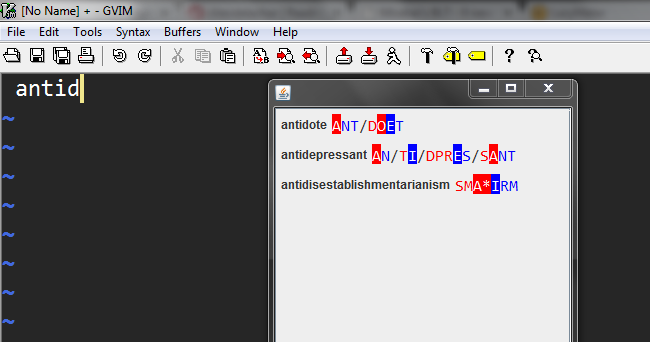
You can configure it to show you either raw steno or pseudosteno, depending on how comfortable you are with transliterating the letters on the keyboard; in raw steno mode, it would show you SPHAEURPL instead. StenoTray works in Windows, Mac, and Linux, and it's an invaluable utility for both steno newbies and advanced users. Check it out!
A few other exciting updates:
* Hesky has now implemented compatibility with the Treal steno machine, so if you've got one, you're in luck.
* If you want to view your raw steno notes as you write, there are now instructions on the Wiki. Linux and Mac users use the terminal, while Windows users need to download a free program called BareTail.
* John Keyes, the former owner of the @plover Twitter account, has generously signed it over to us, so if you want to receive pure, unadulterated Plover information on your Twitter feed (as opposed to the mixed Plover, CART, steno, day-in-the-life, and accessibility tweets you get on my stenoknight account), feel free to follow @plover.
* Also, just a reminder about The Plover Aviary, our user forum. Its focus is a bit different from that of the Plover Google Group, which is mostly feature requests, bug reports, and conversations about the future of Plover development. The Aviary is more for Plover users to talk about the best ways of learning steno, different steno theories, and record their daily practice log; that sort of thing. It was pretty quiet for a long time after its inception, but it's definitely been heating up in recent weeks, so feel free to give it a try.
You can configure it to show you either raw steno or pseudosteno, depending on how comfortable you are with transliterating the letters on the keyboard; in raw steno mode, it would show you SPHAEURPL instead. StenoTray works in Windows, Mac, and Linux, and it's an invaluable utility for both steno newbies and advanced users. Check it out!
A few other exciting updates:
* Hesky has now implemented compatibility with the Treal steno machine, so if you've got one, you're in luck.
* If you want to view your raw steno notes as you write, there are now instructions on the Wiki. Linux and Mac users use the terminal, while Windows users need to download a free program called BareTail.
* John Keyes, the former owner of the @plover Twitter account, has generously signed it over to us, so if you want to receive pure, unadulterated Plover information on your Twitter feed (as opposed to the mixed Plover, CART, steno, day-in-the-life, and accessibility tweets you get on my stenoknight account), feel free to follow @plover.
* Also, just a reminder about The Plover Aviary, our user forum. Its focus is a bit different from that of the Plover Google Group, which is mostly feature requests, bug reports, and conversations about the future of Plover development. The Aviary is more for Plover users to talk about the best ways of learning steno, different steno theories, and record their daily practice log; that sort of thing. It was pretty quiet for a long time after its inception, but it's definitely been heating up in recent weeks, so feel free to give it a try.
Saturday, April 13, 2013
Plover Lookup!
An extremely useful new tool has arrived on the Plover scene:
Plover Lookup!
It's a new tool by longtime Plover friend Zerk, brought about by this Aviary thread discussing how to decide which of the many steno outlines matched to a given word in Plover's default dictionary should be used by a novice steno learner. I made a canonical dictionary for Fly, Plover's Linux-only tutorial and drilling tool, but Zerk has upped the ante by including not only the canonical dictionary but also an automatically generated phonetic dictionary as well. It also lists strokes that aren't defined as canonical, alternate, brief, or phonetic, since none of us are patient enough to dig through and categorize the entire 160,000-word dictionary, and it's pretty impossible to write an automatic algorithm that can cover every intricacy of steno. I think this tool will help save a lot of new Plover users a whole lot of frustration. Thanks, Zerk!
Plover Lookup!
It's a new tool by longtime Plover friend Zerk, brought about by this Aviary thread discussing how to decide which of the many steno outlines matched to a given word in Plover's default dictionary should be used by a novice steno learner. I made a canonical dictionary for Fly, Plover's Linux-only tutorial and drilling tool, but Zerk has upped the ante by including not only the canonical dictionary but also an automatically generated phonetic dictionary as well. It also lists strokes that aren't defined as canonical, alternate, brief, or phonetic, since none of us are patient enough to dig through and categorize the entire 160,000-word dictionary, and it's pretty impossible to write an automatic algorithm that can cover every intricacy of steno. I think this tool will help save a lot of new Plover users a whole lot of frustration. Thanks, Zerk!
Subscribe to:
Posts (Atom)