Wednesday, April 16, 2008
Plover must take arguments in its command line. It's very frustrating not to be able to enter "eclipse 0416ap.ecl -mz_edit" or something like that and have the program open up the file of my choice, applying the settings of my choice, all in one step. Instead I have to open Eclipse, then select the user settings I want, and then open the file manually from the menu. Frequently the last-used file in a particular user folder isn't even on my most recent files list, since all my students' classes are aggregated together.

Friday, April 11, 2008
Yet another Eclipse bug:
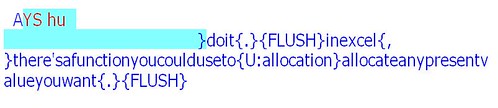
I suppose it's conceivable that this one might be attributed to human error, though if it is, I need to find what the error is so I can never make it again. Am I inadvertently turning stitching on? What the hell's going on? It's happened twice, and as far as I can tell all I've done to cause it is use the "?" key (set to "Find above - RT" in Hyperkeys) to find a word earlier in the document while my steno machine is still realtiming. This is what happens, and the only cure I've found is to stop translation and start another one in a new file. Seriously not cool.
I suppose it's conceivable that this one might be attributed to human error, though if it is, I need to find what the error is so I can never make it again. Am I inadvertently turning stitching on? What the hell's going on? It's happened twice, and as far as I can tell all I've done to cause it is use the "?" key (set to "Find above - RT" in Hyperkeys) to find a word earlier in the document while my steno machine is still realtiming. This is what happens, and the only cure I've found is to stop translation and start another one in a new file. Seriously not cool.
Another baffling Eclipse bug:

The text was intended to be in all caps, but when I started writing, it came out mixed case. So I closed the file and started a new one. Now, going back to the transcript of the original file, I find that it appears to be mixed case initially (top picture), but as soon as I press page down, it transforms into all caps (bottom picture). Page up, and it's mixed case again. What in the flurgh?
The text was intended to be in all caps, but when I started writing, it came out mixed case. So I closed the file and started a new one. Now, going back to the transcript of the original file, I find that it appears to be mixed case initially (top picture), but as soon as I press page down, it transforms into all caps (bottom picture). Page up, and it's mixed case again. What in the flurgh?
Wednesday, April 9, 2008
A wacky bug in Eclipse:
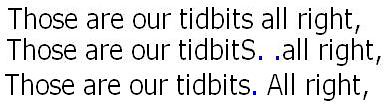
As far as I can figure out, I defined -FP as {FLUSH}, and so every time I tried to write FPLT and it came out FP (as it often does), instead of a period, I got what appeared to be dead space. The first line is what it looked like on screen; the last line is what I originally intended. But the middle line is what I got when I positioned my cursor after the word "tidbits" and pressed "." to insert a period. Now, how the hell did that happen? And what does it mean for Plover, if anything? Something to consider. I've now defined -FP as {.}, so here's hoping that'll solve the problem.
As far as I can figure out, I defined -FP as {FLUSH}, and so every time I tried to write FPLT and it came out FP (as it often does), instead of a period, I got what appeared to be dead space. The first line is what it looked like on screen; the last line is what I originally intended. But the middle line is what I got when I positioned my cursor after the word "tidbits" and pressed "." to insert a period. Now, how the hell did that happen? And what does it mean for Plover, if anything? Something to consider. I've now defined -FP as {.}, so here's hoping that'll solve the problem.
Tuesday, April 8, 2008
It's ridiculous that Eclipse prevents multiple occurrences, and that I'm not able to have different user settings apply to different opened files. So I'm unable to set Eclipse running, start a job with the user settings of the student's next class, and then open another file up with another student's settings so that I can get some transcript editing done without having to worry that the class will start and catch me unprepared to start writing immediately.
Subscribe to:
Posts (Atom)