Wednesday, August 14, 2013

Introducing the Stenosaurus!

At long last, the exciting announcement!


Josh Lifton, Plover's first programmer way back when we started this project together in 2010, has begun the process to manufacture a new kind of steno machine. In his post on the Plover Google Group, Josh says:

"Hi all,

I'm excited to announce the Stenosaurus, a new stenotype machine I'm in the process of manufacturing. You can think of Stenosaurus as the hardware version of Plover - imagine having Plover with you no matter what computer you were using, without ever once needing to install any software. Stenosaurus is a drop-in replacement for a USB keyboard on any computer. As far as the computer is concerned, Stenosaurus appears just like any other USB keyboard. Under the hood, though, Stenosaurus is performing the same lookup and dictionary manipulation as Plover normally would.

You can catch a glimpse of the first prototype and sign up on a mailing list at http://www.stenosaurus.com.

Here are the features I'm shooting for:

* open source software and hardware
* availability late this year at a price point between $200 and $500
* bamboo case with natural zero-VOC wood finish
* removable brushed and anodized aluminum keys, available in different colors
* MX Cherry Black key switches
* 16x2 character LCD screen for displaying outlines and just-in-time dictionary updates
* power and communication via a removable USB cable
* dictionary stored on removable mini SD card
* no requirement to install software, so compatible with any USB-enabled computer
* desktop software tools for converting dictionaries and applying firmware updates
* lightweight, small form factor (approximately 9" x 7" x 1")
* usable on a table, lap, or tripod
* protective carrying case for stowing in a backpack
* sustainably manufactured
* appropriate for professional stenographers, hackers, and curiosity seekers

Don't hesitate to suggest other features!

I'm Plover's original programmer, so of course Plover had a considerable influence on Stenosaurus. At the same time, I'm building Stenosaurus from scratch. To keep costs down, the brain of Stenosaurus is necessarily too small to embed Plover directly, so even the firmware is being coded from the ground up. From the very first day Mirabai and I sat down together to work on what would become Plover, I've wanted to build a new stenotype. After several years and many diversions, Stenosaurus is it.

It's great to see how Plover has matured and taken on a life of its own. If you're at all interested in following this offshoot of Plover, please sign up on the mailing list at stenosaurus.com and joining the Stenosaurus Google Group."


Isn't it completely freaking gorgeous? I can't wait 'til I can get one. He's bringing a physical prototype (keys and case assembled, but no electronics yet) to meet me here in NYC next week. We'll hammer out any additional design details (wide keys, vowel key height, et cetera), then he'll go back to the West Coast to work on the firmware for the functional prototype, and as soon as we've got one operational Stenosaurus built, he'll put a crowdfunding campaign in place to get it made. I can see so many uses for this thing. It'll have mechanical keys, not lever-mounted ones, so I don't think it'll totally supplant the feather-light touch of my Infinity Ergonomic in most of my daily CART work, but it'll be light and slim enough that I can carry it in my bag every day as a backup, in case my Infinity breaks. I'll be able to use it at home as a keyboard replacement for my desktop machine -- no more slow and clumsy qwerty -- without having to wrassle my big Infinity out of the bag, unfold its arms, and set up my tripod every time I want to steno at my desk. Eventually I'm hoping we'll be able to get a special edition of the Stenosaurus with Bluetooth, which I can use with Glass or my Android tablet to enter text on the subway or in the park. It'll be an invaluable bang-up machine for traveling, or for taking to places where I'm worried my Infinity might get stolen or damaged. And I think it'll be a wonderful solution for steno students or enthusiasts who've outgrown the keytopped Sidewinder but aren't in a position to pay thousands of dollars for a professional machine.

As Josh mentioned, the Stenosaurus isn't officially a branch of The Plover Project, even though it was originally inspired by Plover and will be made by Plover's first developer. Hesky will continue to work on the main branch of Plover, and all the people who are working on tutorial material (interactive drills, games, and the like) will keep their attention primarily directed towards Plover users. But I think there's gonna be huge amount of overlap between Plover users and Stenosaurus owners, which is fantastic. Josh thinks he'll be able to incorporate a "steno machine mode" into the Stenosaurus, switching off the on-board translation to English and outputting serial steno code instead, so that it can work with both Plover and proprietary steno software.

But seriously. Just look at this thing. Bamboo and anodized aluminum. Tiny and lightweight. Plug-and-Go steno to English. What a beauty. There's been a huge demand for a low-cost, purpose-built steno machine for years and years and years now. I can't wait until it's finally under my fingers.

Monday, August 12, 2013

Version 2.5.6 Released

Another bugfix release of Plover, hot off the press of the ever-amazing Hesky.

* Speeds up text output. If you've noticed that recent versions of Plover have been releasing the text more slowly than before, this fixes the problem.

* Recognizes DigitalCat's dictionary command for 'capitalize next'.

Download it here!

I haven't forgotten about the exciting announcement I mentioned in the previous post. I'll hopefully be able to make it later today! It's a doozy. (':

Friday, August 9, 2013

Tons of New Stuff!

So much stuff is going on in the Plover universe! I've got a really huge announcement that I'll hopefully be able to spill tonight or tomorrow, but in the mean time, there's been...

A new iteration of Plover, version 2.5.5, released!

Changes since the last version I posted here:

* Fixed crash when reading options with invalid values for machine
* Fixed dumping experienced on some stentura machines e.g. elan mira
* Improved orthography by choosing more common word in the dictionary
* Fixed suffix folding to not interfere with translations in the dictionary
* Can now output non-latin characters on OSX
* Output on OSX is independent of keyboard layout
* speed up startup time on OSX
* Fixed bug in suffix folding

There's now lots of new stuff to buy in the Plover store.

Jay and John (who made the Plover Demo) have devised a brief Plover Community Survey, and are asking all users and prospective users of Plover to weigh in. I'll post the concatenated results when they come in.

And finally, since I'll be at the NCRA Convention in Nashville this weekend and hopefully spreading the news about Plover to everyone there, I've written a FAQ for Steno Professionals. If you know all about steno but this is the first time you've heard about Plover, this is the FAQ for you. Of course, we also have our regular FAQ for steno newbies.

Stay tuned for the exciting announcement! I can't &@#$% wait to post it. Sooooooon...

Tuesday, July 30, 2013

Plover 2.5.2 Released

From Hesky:

"This is a bug fix release and contains the following changes:

- Fix handling of prefixes in rtf dictionaries
- improve port scanning in linux
- NKRO input in linux now works regardless of language setting (thanks to sbuller)
- Try to fix reported issue of key events arriving out of order on linux (fix is unverified)."

https://github.com/plover/plover/releases/tag/v2.5.2

Monday, July 29, 2013

Stenotutor


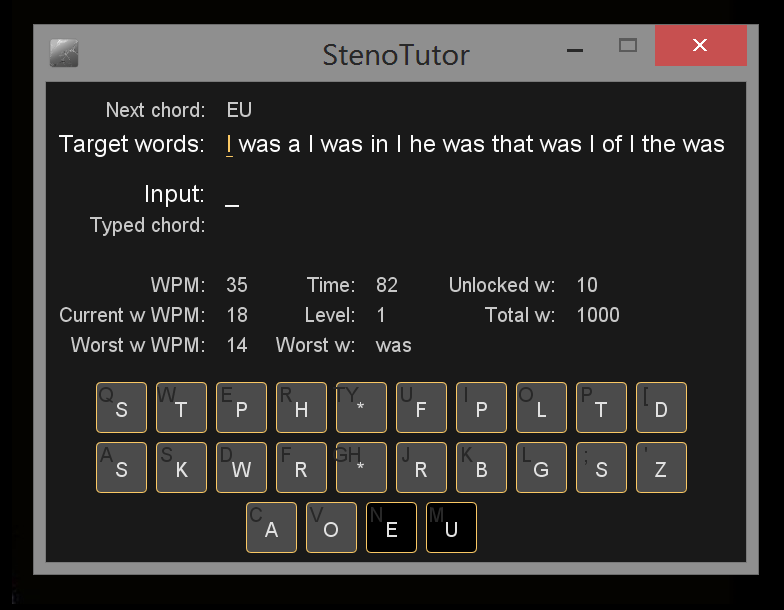
The amazing Emanuele Caruso from the Plover Google Group has just released a new version of StenoTutor, his amazing cross-platform steno drilling software. It's a perfect introduction to steno for absolute beginners, and it can also be customized with harder word lists and lessons for more experienced users. As you can see in the screenshot above, by default it drills you on the 1,000 most common English words, drawn from the Plover dictionary. You start out with just a few, but as you get quicker and more fluent in writing them, more words are added into the mix, and StenoTutor is able to judge when you're good enough to move on and when you need a little extra drilling practice with each word. It's a marvelous way to get up to speed with steno very quickly, and the new release also has optional text-to-speech capabilities. Check it out!

StenoTutor 0.1.0

Monday, July 22, 2013

Plover 2.5.1 released!

Hesky continues to set the world on fire, with yet another pivotal release of Plover! These notes are for the 2.5.0 release, because the 2.5.1 release is just a bugfix.

New Features:

- Suffix folding: when a suffix stroke (-G, -D, -S, -Z) is used and the outline is not in the dictionary then the outline is looked up without the suffix and then the suffix is added. For example, if TURPB was turn and -G is {^ing} and TURPBG is not in the dictionary then if you stroke TURPBG Plover will output turning.

- Support for multiple dictionaries with the lowest dictionary having priority. i.e. if a stroke is defined in the last dictionary then it overrides the entry in the previous dictionary.

- Arpeggiated stroke input for non-NKRO keyboards can be turned on in config. With this option on you can type strokes one key at a time and they will be sent when space is pressed.

- Save position (and size where applicable) for Plover windows. This means that most windows will be in the place you left it.

- Stroke display window with two styles (paper and raw) can be opened from options and can be made to open on startup. Can optionally be always on top.

- Better support for punctuation in caseCATalyst dictionaries. Users reported that in dictionaries from casecat there are spaces before punctuation. That should now be fixed.

- Backspace keystrokes when using keyboard to activate plover (resume, toggle and quit commands). Up until now using the keyboard to turn on Plover would leave behind typed characters. That should now be fixed.

- Fixed saving of stop bits in serial config dialog. There were problems with saving stop bits. That should now be fixed.

- Support Passport machine protocol. This is confirmed to work with Passport machines.

Download the new release here!

Windows
Linux
Mac

I'm particularly thrilled about the suffix folding and multiple dictionary features. So exciting!!

Friday, July 12, 2013

Plover 2.4.1 Released!

Yet another rapid-fire Plover release, from our staggeringly prolific lead dev Hesky! This guy, I tell you. Amazing. His notes below.

"Hi Everyone,

There is a new version of Plover available: v2.4.1

This update includes new features and bug fixes:

- Fixed problem with strokes not recognized when using a DigitalCAT RTF dictionary
- Fixed paragraphing for CaseCATalyst dictionaries
- Added indentation for continuation paragraphs in RTF dictionaries
- Added lower case command similar to capitalize that makes the first letter of the next word lower case: {>}
- Fixed bug in how prefix, suffix and infix were loaded from RTF dictionaries that was preventing automated spelling from being applied.
- Improved automated spelling using a wordlist. I'm hoping this will be a big improvement. Please send me examples when plover makes spelling mistakes applying suffixes so I can try to continue improving this.
- Added a way to prevent automated spelling from being applied by putting a {^} between prefix/suffix and the word. This allows a quick way to disable automated spelling when it does something wrong.
- There seems to have been a bug that prevented buttons on the Add Translation dialog from being pressed with the mouse on windows. This is now fixed but the downside is that tabbing in the dialog now includes the buttons and not just the text fields. One workaround for now is to use {#Shift_L(Tab)} to move from translation to stroke rather than pressing {#Tab} three times.

Windows: https://github.com/plover/plover/releases/download/v2.4.1/plover.exe
Mac: https://github.com/plover/plover/releases/download/v2.4.1/Plover.dmg
Linux: Follow instructions here: https://github.com/plover/plover/blob/master/README.rst

As always, please let me know how it goes and if you have any trouble."