Thursday, February 28, 2013

Vote for Mel Chua and Help Plover Win $1,000!

Mel Chua has been an ally of Plover since pretty much the very beginning. She wrote a fantastic article on Plover for opensource.com, helped me with steno pedagogical theory, came up with the idea of using lasers to manufacture the keytoppers, and has just generally been an unending source of inspiration and awe. She's an engineer, hacker, teacher, dancer, writer, open source advocate, and visionary.

She's currently a finalist in Oticon's Focus on People Awards:


Click here to vote for Mel!

She writes:

"If I win the first place award, here’s what I’m planning on doing:

1. Using the $1k given to me to offset cochlear implant medical costs.

2. Giving the other $1k to Plover, an open source software project that brings the cost of live transcription (Communication Access Realtime Transcription, or CART – think “closed captioning for real life”) from $4000 down to $40. Making this capability cheaper and more widespread (it’s very rare right now) would open up a ton of accessibility doors to people who struggle to understand spoken English (maybe they have hearing loss, or they’re still learning English, or have auditory processing disorders, or need to multitask and watch kids or cook dinner and are floating in and out of the conversation). It’s being developed by a tiny, tiny group of very excited volunteers and needs all the help it can get!

3. Working with the audiology department at Purdue University, where I’m a PhD student (in engineering), to use the hearing instruments for labs and demos to educate more students about hearing technologies."


So if she wins this contest, not only will she get $1,000 to help her pay for cochlear implants, but she'll give $1,000 to go towards development of Plover! Please vote and boost the signal. Mel is one of the most amazing people I've ever met. The Plover Project is incredibly lucky to have her on its side.

Please click here to vote for Mel!

Thursday, January 31, 2013

TX Protocol Splitting Fix?

I don't know how many people have tried using Plover with the TX Protocol, but at least a few have reported that strokes get split apart. (It's a registered issue on our Github).

Hesky's attempted to write a fixed version, which can be downloaded here.

He writes: "Unfortunately, I haven't been able to reproduce the bug on my own but I've made a change that may fix the problem. If you've been experiencing splitting while using txbolt protocol with your machine, then it would be a great help if you would try this version of Plover and let me know if it fixes this problem."

If you've got a TX protocol machine, please give it a try, and let us know whether it fixed the problem. If not, more details on exactly how the splitting is happening would be very helpful.

Saturday, January 26, 2013

Steno 101 Lesson Four

Steno 101: How to Do It
Steno 101: Lesson Zero
Steno 101: Lesson One
Steno 101: Lesson Two
Steno 101: Lesson Three
Steno 101: Lesson Four

Sorry this is so overdue. I've been waiting for the just-in-time dictionary entry feature to be coded, because there's not much more Steno 101 stuff I can write without it in place. Pretty much all the rest of the stuff I want to teach you about steno involves defining your own entries, and currently the text editor-based method of doing that is just too slow and clunky. Hopefully the wait won't be too much longer. But I realized that there was one last little thing I could teach you before we're really gonna need that feature: Numbers.
You'll notice that if you press both the number bar and another key on the top row of the steno machine (for Sidewinder users, that's any of qweruiop (plus c and v; more about that later) combined with any of 1234567890), you get a single digit number. Here's the map of how that works:

STPH AO FPLT
1234 50 6789

You don't have to hit the number bar key directly above the letter you want, though that’s usually the easiest way to make it work. If you're using a Sidewinder (with or without laser keytoppers), you just sort of rock the flat pads of your finger down so you're hitting both keys at once with a single finger. The thing with the number bar is that it's basically a toggle switch. All of the number bar keys are identical, and you can press as many of them as you want at a time, but all that matters is that at least one of them is pressed at the same time as one of the top row letters. What about A = 5? And O = 0? Yeah, that seems a little strange, but it actually works quite well. See, steno lets you write as many numbers in one stroke as you like, but it always renders them in steno order. So in a single chord you can write:

123456789 (Number bar, which is usually rendered # in steno code, plus STPHAFPLT)
14578 (#SHAPL)
3569 (#PAFT)

Et cetera. Using the thumb for 5 gives you a finger for all 9 digits. O for 0 comes in surprisingly handy too; it means you can do any two digit multiple of 10 in a single stroke:

10 (#SO)
30 (#PO)
50 (#AO)

But wait -- what happens if you do O plus a number on the right side? Huh. Instead of multiples of 10, you get...

06 (#OF)
08 (#OL)
09 (#OT)

So how do we do multiples of 10 between 60 and 90? Using our friend the inversion toggle. That's EU. Now, this isn't built into Plover; it's a dictionary hack. All the necessary definitions are in the Plover dictionary, but if you're using a different dictionary, you'll have to paste in the entries from that file I mentioned above to make it work. When you add EU to any number, it reverses their order.

60 (#OEUF)
80 (#OEUL)
90 (#OEUT)

It works for all two-digit numbers; not just multiples of 10.

45 (#HA)
54 (#HAEU)

37 (#PP)
73 (#PEUP)

29 (#TT)
92 (#TEUT)


Okay, what about if you want to do numbers longer than two digits? Numbers have a special property in steno. Like the letters you use for fingerspelling (A*, PW*, KR*, etc.), they're what's known as "glue strokes", meaning that when they're written next to another glue stroke, they stick together, but when they're written next to a non-glue stroke, a space is added between them as if they were ordinary words. So if you write:

EU/AEUT/#H/#TF/TPHRABGS/SAOEDZ/TP-PL

It comes out:

I ate 426 flaxseeds.

That will work for any combination of letters or numbers written in a row. If you want to write numbers or letters that don't stick together, you'll have to insert a space manually.

U/K-/SR/ELG/#S/S-P/#S/OEU/#L/PAOEFS/-F/PAOEU/TP-PL

You can have exactly 1 1/8 pieces of pie.

S-P corresponds to "insert a space", and OEU is the stroke for {^/^}, which is not a glue stroke, but a conventional delete space stroke, meaning that anything you write to the left and right of it will be joined to it without a space. Similarly, you can use P-P for {^.^}, which works as a decimal point (it's also useful for adding the ".com" to URLs), *RBGS {^,^} for commas in numbers, and H-PB for {^-^}, which gives you a hyphen. And you can use TK-PL for {$^}, which will insert a space before the dollar sign but stick it without a space to anything following.

There are a few other cool things you can do wit h numbers. Adding a -D to a single digit will double it:

33 (#P-D)
55 (#AD)
66 (#FD)

Adding -Z will tack on two zeroes:

300 (#P-Z)
500 (#AZ)
600 (#FZ)

And adding -DZ will tack on two zeroes plus a dollar sign:

$300 (#P-DZ)
$500 (#ADZ)
$600 (#FDZ)

Examples:

406-549-0734 (#HOF/H-PB/#A/#HT/H-PB/#OP/#PH)
3,218,106 (#P/*RBGS/#T/#SL/*RBGS/#SOF)
$48.86 (TK-PL/#HL/P-P/#FEUL)
33/8 (#P-D/OEU/#L)

I've also recently started doing Roman Numerals by adding R to single digits.

IX (#R-T)
VIII (#R-L)
XII (#ST-R)

And you can use "TWOUPB" to add {200^} to single digit numbers when you want to write years.

2006 (TWOUPB/#F)

Now, some steno schools don't teach the number bar at all. Instead they teach students to write everything out in words:

one (WUPB)
two (TWO)
three (THRAOE)
four (TPOUR)
five (TPAOEUF)
six (SEUBGS)
seven (SEFPB)
eight (AET)
nine (TPHAOEUPB)
ten (TEPB)
hundred (HOEUPB)
thousand (THOEUPB)
million (PHOEUPB)
billion (PWOEUPB)
trillion (TROEUPB)

And use their proprietary steno software to automatically translate, for example,
One hundred twenty-eight (WUPB/HOEPB/TWEPBT/AET) into 128

I'm afraid that Plover doesn't support this capability, and it's not a high priority for our developers to implement it, so don't hold your breath. You can write the words; most style guides suggest using words rather than numerals for one digit numbers in speech. But if you want the digits, you'll have to write the digits manually using the number bar.

So that's about all I've got to teach you about numbers. It takes a bit of practice to internalize them, but once you do, you'll find that the number bar is an incredibly useful addition to your steno arsenal.

Monday, January 14, 2013

Steno Alphabet Posters

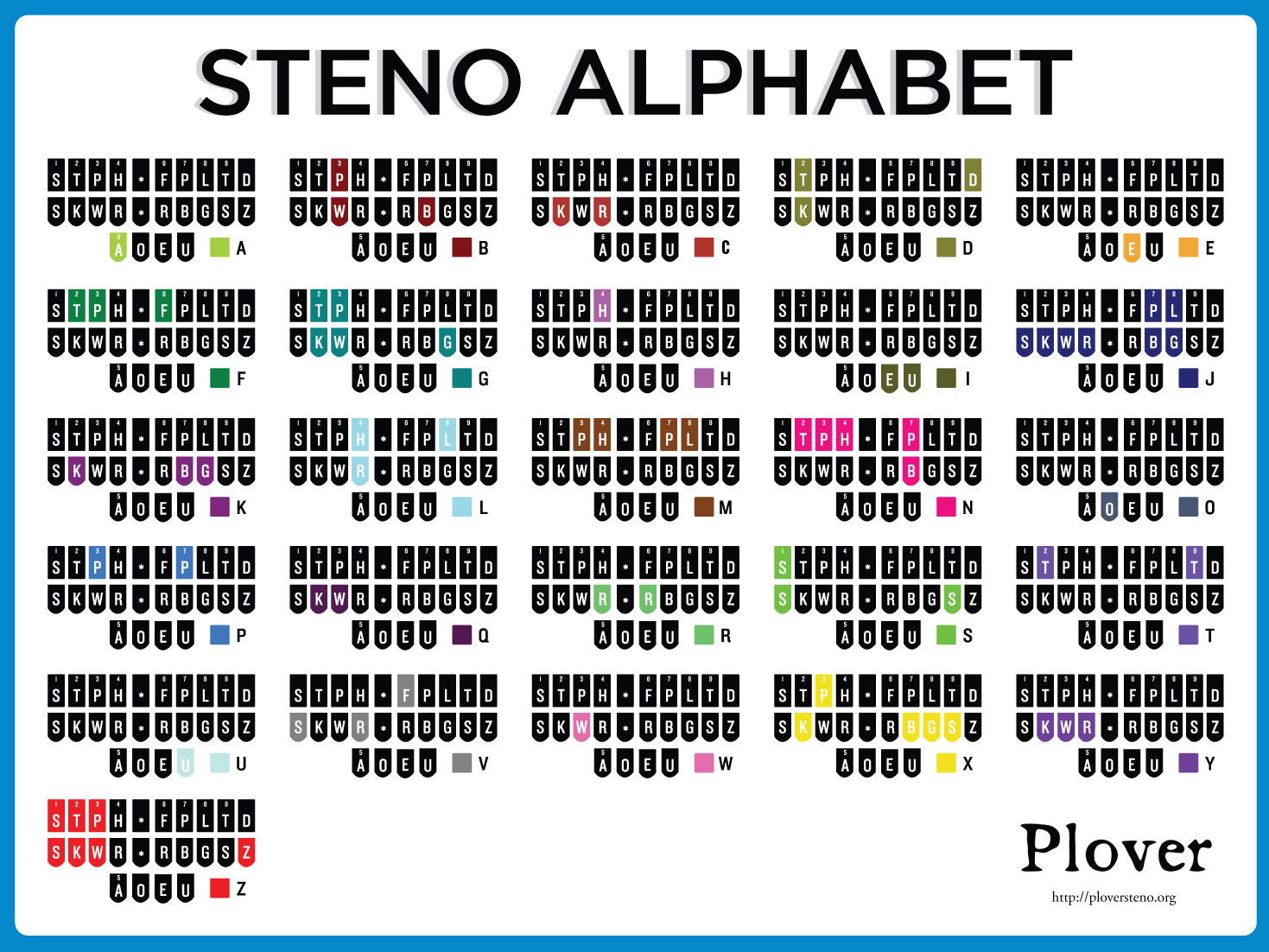
I linked to the final version of the steno alphabet diagram back in November, and now I've finally got a cleaned up version of the same information in alphabetical rather than pedagogical order:


As I mentioned in the other post, I'm currently working with In a Flash Laser, the company in charge of The Plover Store, to get nice printed posters available for sale, along with some nice new Plover swag like laser-engraved coffee mugs and flash drives preloaded with the latest source from Github. (A live portable version of Plover would be even better, so you could carry the flash drive and your n-key rollover keyboard around with you and use it from any terminal, but I'm afraid that hasn't been coded yet.)

So in order to figure out exactly what we should look for in terms of poster printing options, how many of you would want to purchase a professionally printed poster, as opposed to just downloading the jpgs and printing them yourself at home (which, of course, you're perfectly free to do). If you do want to buy a poster, what size would be most useful to you? And would you be more likely to get the one in pedagogical order, the one in alphabetical order, or both? Finally, what's the top end of what you'd be willing to pay for such a thing? Any and all opinions very welcome. And if you've got any other ideas for stuff to offer in the Plover Store, please feel free to mention them in the comments. The Store takes a small cut of items to fund Plover development, but its main purpose is to get Plover-relevant stuff out to interested people as quickly and simply as possible. I'm hoping that once we get that crucial just-in-time dictionary entry feature coded (currently under review by a new contributor to the project) and after we get a signal boost from PyCon, we'll be selling keysets and steno charts like so many efficient little ergonomic hotcakes.

Sunday, January 6, 2013

UK Spellings Dictionary


The fantastic hackers on the Plover Google Group have done it again. After a user in Australia requested a version of Plover's default dict.json file with UK/Australian/Canadian spellings, they came through in a matter of minutes:

gbDict2.zip

So if you've been annoyed or frustrated by Plover's American-centric dictionary, or if you're just a shameful pretentious Anglophile (like me), now you can enjoy your open source steno* lexicon entirely Yank-free. Many thanks to Rob and Hesky for their lightning-quick delivery!

*No, we still don't support Palantype. Maybe someday. Then again, maybe not. (';

Saturday, December 29, 2012

Dictionary Converter!

I just got back from a trip to Missoula and Seattle yesterday, so I've got to apologize for not being on top of Plover stuff for the past few weeks, but I had to check in to let you guys know about something pretty exciting. I know a few professional stenographers and steno students have been following Plover for a while, but they haven't had the chance to get their feet wet with it, because until now there hasn't been a way to easily convert their own dictionaries from rtf/cre format (which is the universal format exported by commercial steno software) into json format (which is the format used by Plover). Thanks to Hesky, our amazing lead developer, the wait is over! Introducing...

The Plover Dictionary Converter!

I haven't even gotten a chance to test it yet (though that's at the top of my list of things to do now that I'm home again), but I wanted to let everyone know about it. It's currently accessed via the command line, though I hope that we'll be able to get a more user-friendly GUI version of it eventually, and hopefully even integrate it into Plover itself. If you try it and it gives you any hassle, feel free to lodge a bug report at the github; it'll help Hesky refine it and improve it for the future. This is really going to help in bringing Plover to the court reporting, captioning, CART, and student communities, and I'm pleased as punch.

Oh, and just one more thing. The Aviary (Plover's user forum) has been pretty quiet lately, both from regular users (which isn't too unusual, since it's a pretty small community at the moment) and from spammers (which is, since until recently we were getting nearly 100 spam messages and user sign-ups per day). Happily, the latest spam-trapping tools I've put in place have proven wonderfully effective, so I've been able to remove moderation from first-time posts. If that's been holding you back from signing up for the forum, it's your lucky day. Now you can join and post unmoderated to your heart's content. I reserve the right to reinstate first-post moderation if the spam gets bad again, but here's hoping we've got those spammers licked for good. If forum-style discussion isn't your thing, there's also always the Google Group, which tends to have more technically oriented discussions about the development of Plover and the future of steno learning, rather than the day-to-day, boots-on-the-ground conversation you tend to find at the Aviary. Feel free to join either or both!

Tuesday, December 11, 2012

Steno Typer - New Online Steno Trainer

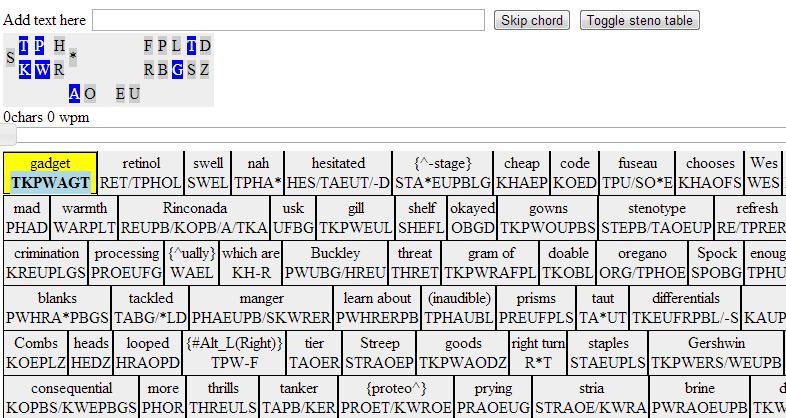
Many people enjoy Thomas Thurman's steno practice page, which consist of 21 sentences using the 100 most common English words, but if you've like some more practice with single words (and you don't have Linux, so you can't use Pragma Nolint's fantastic Plover trainer Fly), give Steno Typer a try:


It was written by Kitlei Róbert, a computer science professor in Budapest. It draws on Plover's admittedly patchy dictionary for words, so if you see a steno translation that you don't like, feel free to skip it, or, if you prefer, download the source here and modify it to your heart's content. Eventually, I think I'll probably swap it out with the "canonical" list of words I made for Fly, which contain only steno strokes that make logical sense to people who know the theory, and don't include potentially confusing definitions like misstrokes and briefs that popped randomly out of my head without any mnemonic justification.

Oh, and I've posted about it to Twitter, but I haven't yet mentioned on this blog: Plover's going to PyCon!


My talk, Thought To Text at 240 WPM (an expansion of the one I originally gave at PyGotham in 2011) has been accepted at PyCon 2013, in Santa Clara, CA, this March. I'm really excited. So that I don't sound like a total poser, I've started going through the Python lessons at Codecademy. I'm right at the beginning, and still covering stuff I'm pretty familiar with (I've been sporadically trying to learn Python for over five years now, and each new false start leaves me with a little more knowledge than the last), but I'm hoping that by the time I reach the end of the course I'll be confident to move up to the next level, either by getting a Python tutor or by working through another self-study course. (I had fairly good luck with CodeLesson a while back, but had to quit partway through Python II due to time constraints). My brain doesn't seem to absorb this sort of thing very readily, but I'm not giving up, even if it takes another five years to figure out how to use @#&% classes.